
Offer Ends In
00
:
00
:
00
:
00
Single Sign-On (SSO) is an authentication method that allows a user to authenticate once and gain access to multiple applications or services with one account and without being required to log in again for each individual system.
Rather than each application independently managing usernames, passwords and authentication logic, SSO centralizes authentication in one account Once identity is verified, access is granted widely to multiple systems or apps, requiring just a single click for login.
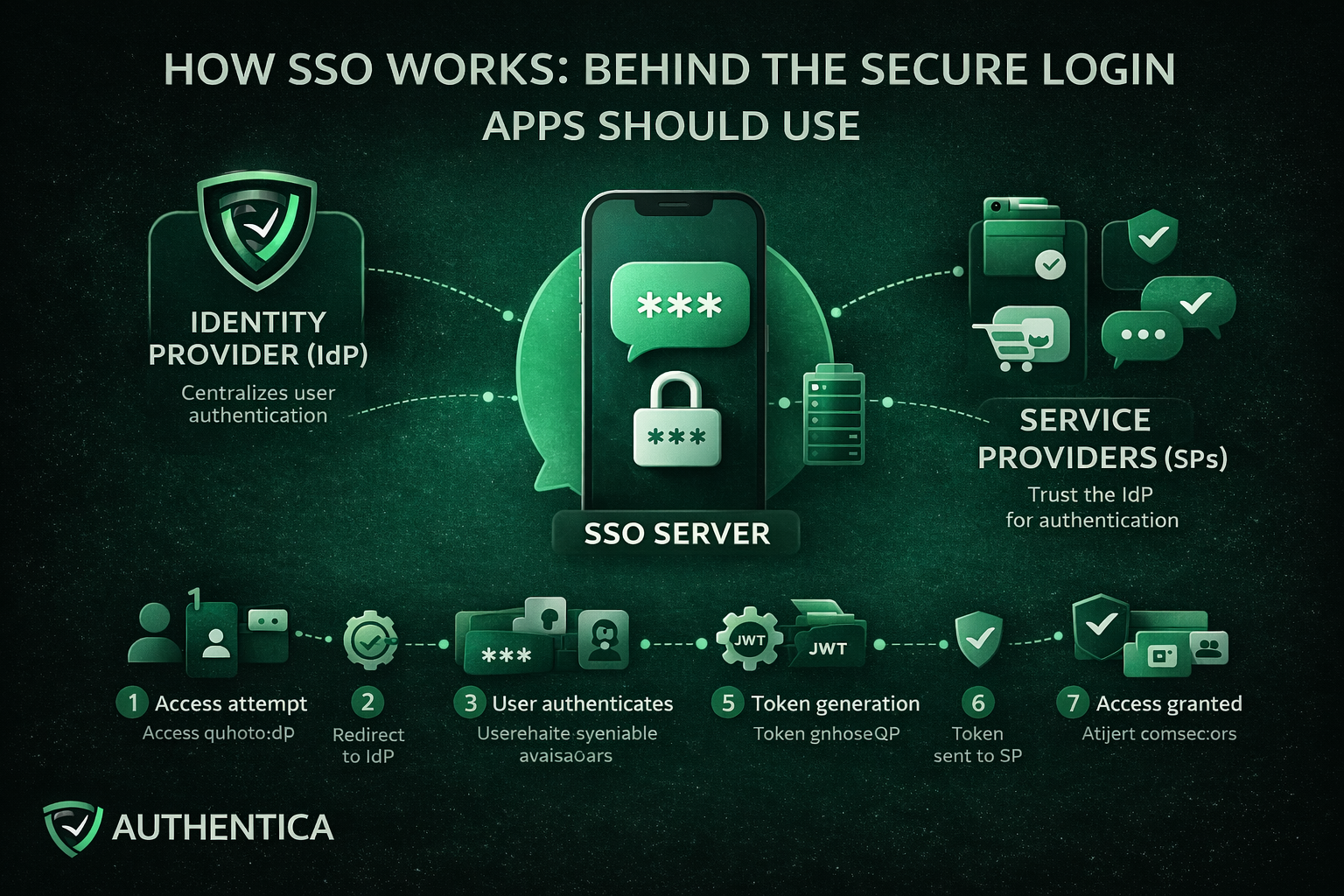
Single Sign-On works by establishing a trusted connection between applications or services and a trusted Identity Provider (IdP). Instead of applications directly authenticating users, they delegate authentication to the IdP. When a user successfully proves their identity with a password or OTP or face recognition, the IdP generates a secure token to confirm this authentication for the platform and other connected ones.
This approach separates identity verification and security from the application. This means that they no longer need to store passwords or manage login, focusing on the quality of the delivered service.
Key Components of an SSO System
The SSO environment is composed of these components that together form the entire lifecycle:
Identity Provider (IdP)
The Identity Provider is the developer of the SSO solution, responsible for authenticating users. It verifies credentials, enforces authentication policies, and serves as the trusted party that applications rely on to authenticate users to their apps and platforms.
Service Providers (SPs)
Service Providers are the applications or services that users want to access, like the app or platform you provide. Rather than authenticating users directly, they trust the IdP and accept validated tokens from them as proof of authentication.
SSO Server
The SSO server works on the coordination and management of the authentication requests, token exchanges, and session continuity between the IdP and the service provider.
Authentication Protocols
Protocols such as SAML 2.0, OAuth 2.0, and OpenID Connect define how authentication data is structured, transferred and validated. These protocols ensure interoperability and secure communication across different systems.
User Directory
The user directory acts as a centralization point for storing records and access information. Common examples include Active Directory or LDAP-based directories.
Authentication Tokens
Tokens confirm a user’s authenticated state and are stored with high security and cryptographic encryption. Examples of tokens include SAML assertions and JSON Web Tokens (JWTs). They are time-limited and digitally signed to prevent tampering and malicious attacks.
The SSO process follows a predictable sequence of stages, that we explain here without much technical complications:
The process begins when a user navigates to an application that uses SSO. At this stage, the application checks whether the user already has an active and valid session or not.
If no valid session exists, the application redirects the user to the Identity Provider. This redirect includes an authentication request that defines the application requesting it and the exact context of the authentication.
The Identity Provider prompts the user to authenticate. This may involve entering username and password, using OTP authentication, or using an existing authenticated session if one already exists.
Once authentication succeeds, the IdP generates an authentication token. This token contains identity information and metadata confirming that the authentication has occurred. The token is also digitally signed using a trusted certificate.
The token is sent back to the original application, typically through a secure browser redirect or back-channel communication. This way, the application has received the token without directly handling user credentials.
The application validates the token by checking its signature, issuer, expiration time, and intended user. This ensures the token has not been altered and originates from a trusted source.
If the token is valid, the application establishes a session for the user and grants access. From this point forward, the user is considered authenticated with SSO.
A Readily Developed SSO Service from Authentica
For organizations looking to implement SSO without the complexity of building and maintaining their own infrastructure, Authentica offers a readily developed SSO service designed to integrate seamlessly with modern platforms and applications.
The service provides centralized authentication across cloud-based, on-premises, and hybrid applications with one API, enabling organizations to unify access management with minimal effort and system disruption and with on-demand fee basis.
Single Sign-On is not just a user experience feature, but its true value lies in how it restructures authentication across systems. By understanding how it works, even with not every technical aspect, you have a better understanding of why SSO should be considered by every app or platform.



